> ## Documentation Index
> Fetch the complete documentation index at: https://docs.powertokens.ai/llms.txt
> Use this file to discover all available pages before exploring further.
# 创建 API Key 并调用模型
> 创建 PowerTokens API Key,并通过平台接口或 Playground 调用模型。
创建 API Key 后,你可以通过平台接口或 **Playground** 调用聊天、图像、视频和音频模型。
## 创建 API Key
打开 [**API Keys**](https://www.powertokens.ai/zh-Hans/api-keys) 页面。
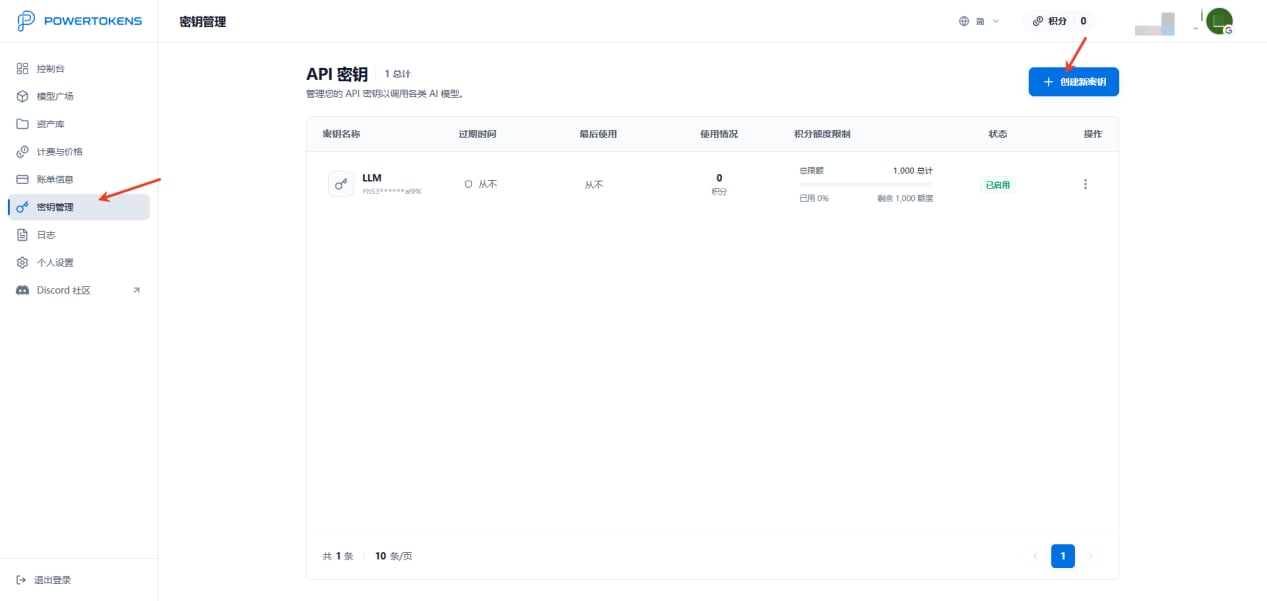 点击右上角 **Create new key**,创建新的 API Key。
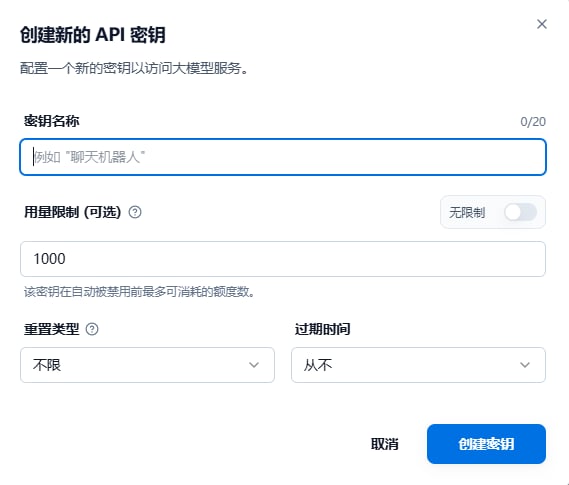 创建密钥时,你可以配置:
* **密钥名称**:使用清晰名称,例如 `LLM-key`,便于按项目管理。
* **用量限制**:可以设置为无限制,也可以设置固定 Credits 上限。额度耗尽后,该 Key 会停止使用。
* **重置类型**:可以选择不重置、每日、每周或每月重置额度。每周和每月重置基于 UTC 时间。
* **过期时间**:可以选择从不过期、7 天或 30 天后过期。
API Key 只会在创建时展示一次。请妥善保存,不要暴露在客户端代码、公开仓库或聊天记录中。
## 浏览模型市场
打开 [**Models**](https://www.powertokens.ai/zh-Hans/models) 页面,选择你需要的 LLM、图像、视频或音频模型。
创建密钥时,你可以配置:
* **密钥名称**:使用清晰名称,例如 `LLM-key`,便于按项目管理。
* **用量限制**:可以设置为无限制,也可以设置固定 Credits 上限。额度耗尽后,该 Key 会停止使用。
* **重置类型**:可以选择不重置、每日、每周或每月重置额度。每周和每月重置基于 UTC 时间。
* **过期时间**:可以选择从不过期、7 天或 30 天后过期。
API Key 只会在创建时展示一次。请妥善保存,不要暴露在客户端代码、公开仓库或聊天记录中。
## 浏览模型市场
打开 [**Models**](https://www.powertokens.ai/zh-Hans/models) 页面,选择你需要的 LLM、图像、视频或音频模型。
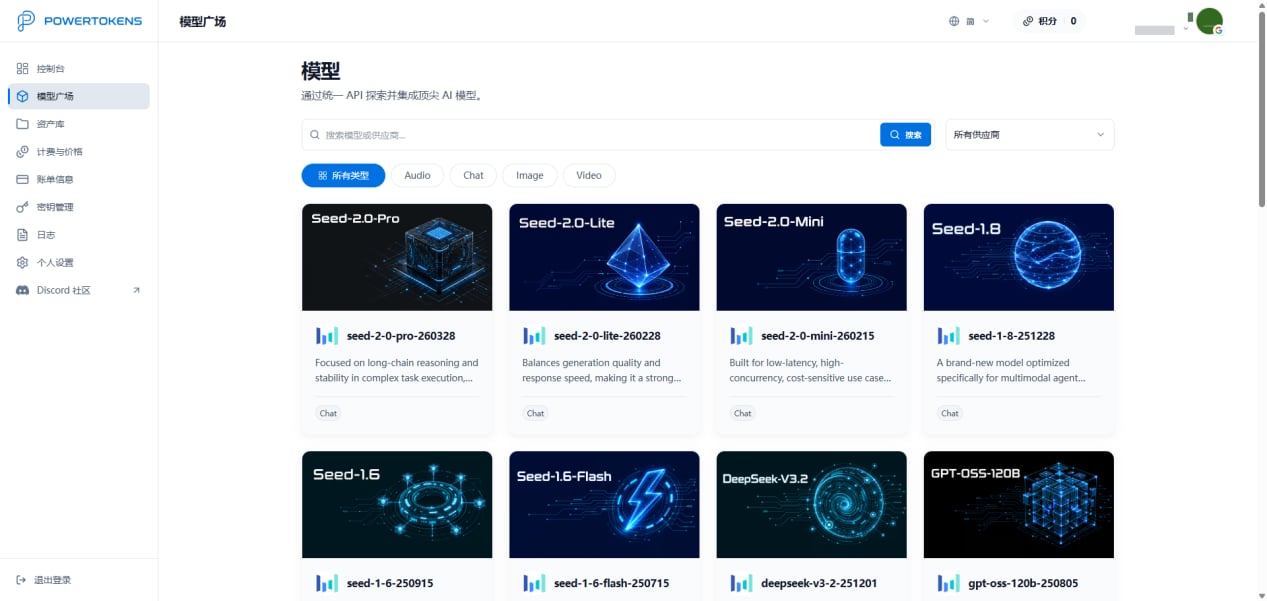 模型详情页会展示模型能力、价格和可用的调用方式。MiniMax 等模型以 PowerTokens 上游渠道能力的形式对外提供,你通过平台统一接口发起请求。
## 使用 API 调用模型
PowerTokens 提供 OpenAI 兼容接口。多数 OpenAI SDK 只需要修改 Base URL,并使用你创建的 API Key。
Base URL:
```txt theme={null}
https://api.powertokens.ai
```
请求头:
```txt theme={null}
Authorization: Bearer
Content-Type: application/json
```
示例请求:
```bash theme={null}
curl --request POST \
--url https://api.powertokens.ai/v1/chat/completions \
--header 'Authorization: Bearer ' \
--header 'Content-Type: application/json' \
--data '{
"model": "MiniMax-M3",
"messages": [
{
"role": "system",
"content": "You are a concise assistant."
},
{
"role": "user",
"content": "Describe Paris in one sentence."
}
],
"temperature": 0.3
}'
```
在发起正式接入前,请根据目标模型页面确认可用参数、请求字段和返回格式。
## 使用 Playground 调试模型
打开 [**Models**](https://www.powertokens.ai/zh-Hans/models) 页面并进入模型详情页。你可以在 **Playground** 中直接测试模型能力,无需先编写代码。
模型详情页会展示模型能力、价格和可用的调用方式。MiniMax 等模型以 PowerTokens 上游渠道能力的形式对外提供,你通过平台统一接口发起请求。
## 使用 API 调用模型
PowerTokens 提供 OpenAI 兼容接口。多数 OpenAI SDK 只需要修改 Base URL,并使用你创建的 API Key。
Base URL:
```txt theme={null}
https://api.powertokens.ai
```
请求头:
```txt theme={null}
Authorization: Bearer
Content-Type: application/json
```
示例请求:
```bash theme={null}
curl --request POST \
--url https://api.powertokens.ai/v1/chat/completions \
--header 'Authorization: Bearer ' \
--header 'Content-Type: application/json' \
--data '{
"model": "MiniMax-M3",
"messages": [
{
"role": "system",
"content": "You are a concise assistant."
},
{
"role": "user",
"content": "Describe Paris in one sentence."
}
],
"temperature": 0.3
}'
```
在发起正式接入前,请根据目标模型页面确认可用参数、请求字段和返回格式。
## 使用 Playground 调试模型
打开 [**Models**](https://www.powertokens.ai/zh-Hans/models) 页面并进入模型详情页。你可以在 **Playground** 中直接测试模型能力,无需先编写代码。
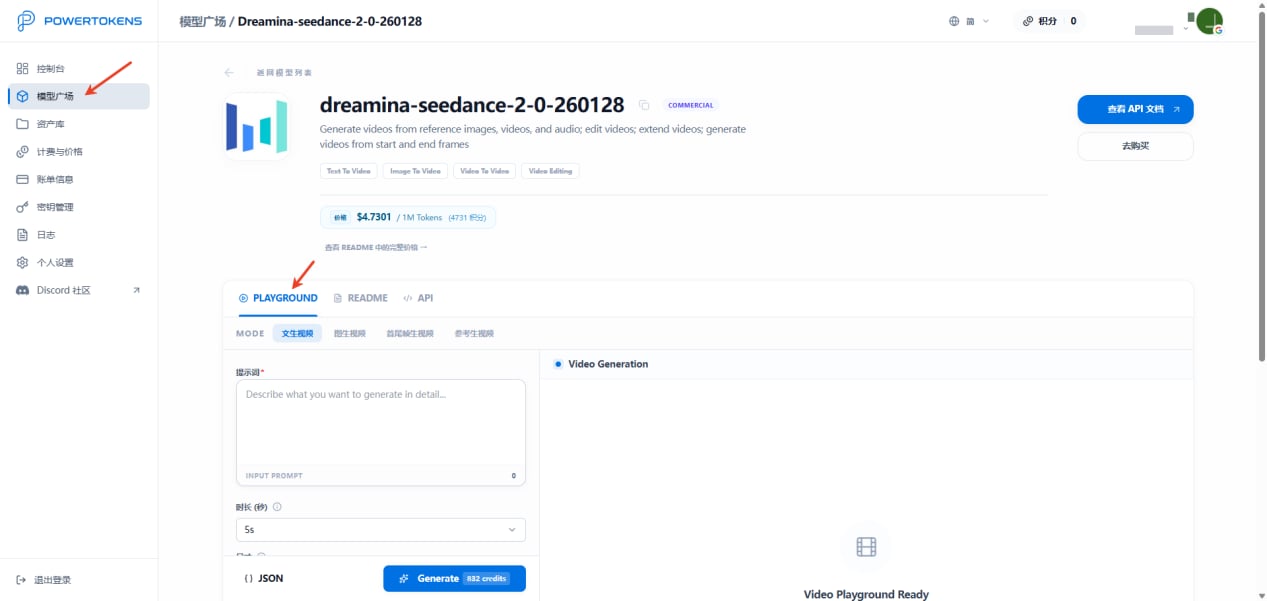 Playground 适合:
* 调试 Prompt
* 对比模型效果
* 测试参数
* 验证原型
完成第一次调用后,继续查看:[日志和用量统计](/zh-Hans/guides/logs-and-usage)。
Playground 适合:
* 调试 Prompt
* 对比模型效果
* 测试参数
* 验证原型
完成第一次调用后,继续查看:[日志和用量统计](/zh-Hans/guides/logs-and-usage)。